
Index
Page 4 of 5
Everyday use:
Working with this notebook was quite ok. Of course we are spoiled brats playing with high-end quad-core CPUs, but for the most important things, like typing or surfing the CPU is fast enough. While this CPU does support 64-bit instructions for some reason MSI decided to install a 32-bit OS version, and we think this is quite lame. Maybe Microsoft does charge the OEMs a bit more for 64-bit versions, but this is an expensive piece of equipment and five more bucks would not have mattered much.
Windows Vista SP1 boots up in about 35s, not that bad. An annoyance is the installing procedure. You have to wait for about an hour till everything is installed. Of course the first thing a Windows users does, is to Update the OS itself. Sadly MSI installs a plain SP1 without any updates, besides an additional installer for IE8. This caused Windows to update another 618MB. Doing that via WLAN you can forget about half a day for sure.
As usual we test how this platform plays a DVD-resolution file and a 720p file. Any media file which is not HD plays without problems. HD content is an entirely different story. The notebook ships in energy saving mode by default, which is too slow to play any HD content. Changing the energy profile to "balanced" makes it possible to play 720p with CPU utilization around 75%. God forbid Windows tries to do something in between, as it then stutters, drops frames, you name it. If you want to watch HD content, disable any network connectivity and it does help to deactivate some services as well.
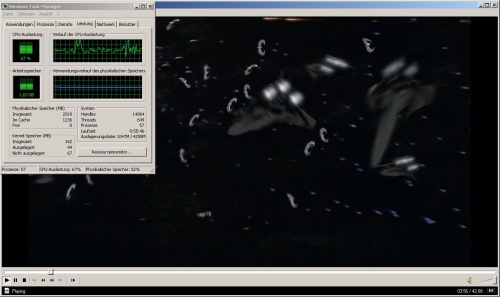
Cliick here for a high-res picture.
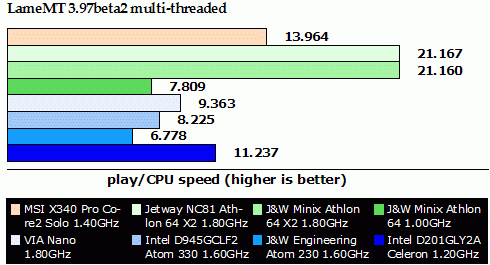
As you remember we like to test our CPUs with lamemt, and so we did with the notebook. Even using the multi-threaded version, this CPU is a single-core and does not support Hyper-Threading. If you would calculate the same frequency as the Celeron you can see, the Core 2 Solo is only 6.5% faster which is quite disappointing.
Display:
The most annoying thing on such a small and portable notebook is its glare TFT. I personally think that who ever invented glare displays should be deported to the moon, or even better somewhere farther away, so he can't do any more damage. While most people won't care if they have a glare screen on a desktop display or a gaming-notebook, an ultra-mobile notebook is something we want to take everywhere we go. Would it not be nice to sit in a café outdoors, drink a Melange (Coffee specialty in Vienna) and do our work? Impossible to do, because the mirror effect won't you allow to work in daylight.
The external monitors are also a crude story. If you happen to have a display with HDMI or you have an HDMI-to-DVI cable, you can use a second monitor. Set the external screen as primary and you can work without problems. If you thought you could use the VGA connector for a secondary display you thought wrong. For some reason only one of the connectors is working properly. Using the VGA alone does not make much sense, because you get a clone of the notebook screen and there aren't many VGA screens with a native resolution of 1366x768. The only two monitor solution that works is HDMI with the notebook screen.