Featured Articles

Nvidia GTX 770 spec is out

Nvidia GTX 770 spec is out

In addition to the GK110 based Nvidia Geforce GTX 780, we managed to get some details regarding the GK104-based GTX 770…

More...
Nvidia Geforce GTX 780 detailed

Nvidia Geforce GTX 780 detailed

We managed to confirm the full spec of the upcoming Nvidia Geforce GTX 780 graphics card as well as some performance…

More...
AMD shares take rollercoaster ride

AMD shares take rollercoaster ride

In the last 52 weeks AMD was on a rollercoaster ride, with prices ranging from $1.81 to $6.46. Yesterday it closed…

More...
HIS iCooler Turbo HD 7790 reviewed

HIS iCooler Turbo HD 7790 reviewed

Today we’ll take a closer look at a factory overclocked HD 7790, courtesy of HIS. The HIS HD 7790 iCooler Turbo…

More...
Kingston DataTraveler Ultimate 3.0 Generation 3 (32GB) reviewed

Kingston DataTraveler Ultimate 3.0 Generation 3 (32GB) reviewed

High capacity USB drives have become commonplace a while ago, but although some memory outfits are peddling huge drives, up…

More...
Frontpage Slideshow | Copyright © 2006-2010 orks, a business unit of Nuevvo Webware Ltd.
Thursday, 16 August 2012 15:00

EVGA GTX 660 Ti Superclocked 2GB reviewed - Overclocking, Noise, Thermals, Consumption

Written by Sanjin Rados

sc-thumbtop-value-2008-lr

Review: Fusion of power, performance, and affordability


The fan is not very loud and working next to a GTX 660 Ti superclocked 2GB is quite comfortable, even when the card is under full load. For our overclocking, we sped up the fan to 80%. We used PrecisionX tool, which of course supports the GTX 660 Ti. To mark the launch, EVGA even made the new skin, picture below.
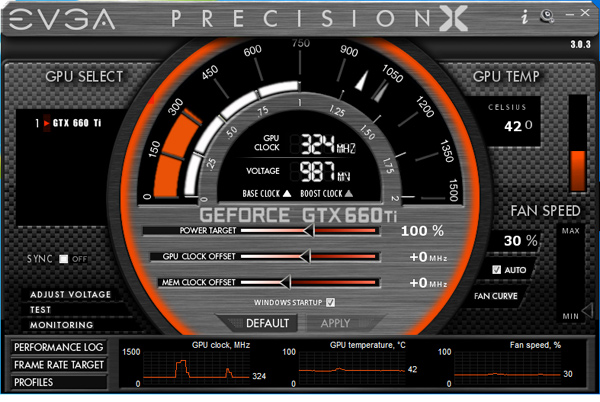
precision-x-default-superclocked

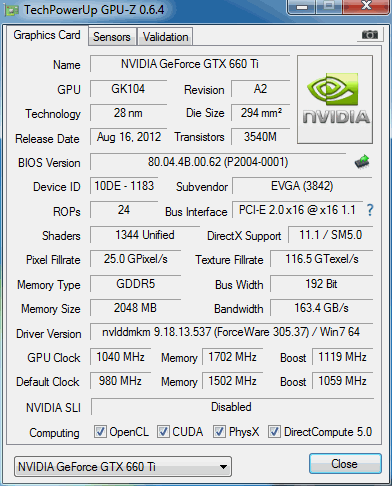
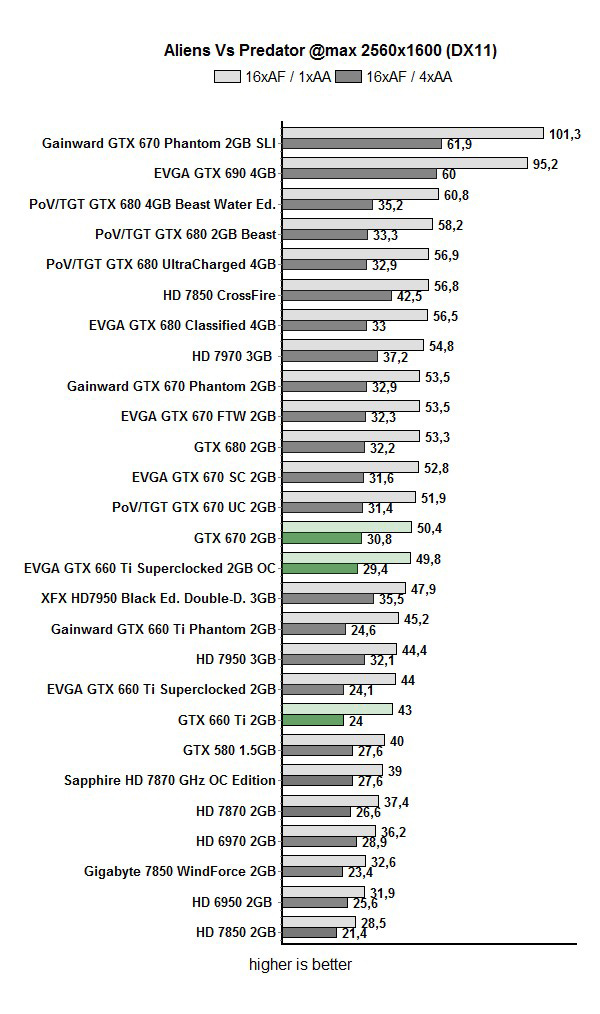
We managed to get GPU clocks similar to those on GTX 670 cards. The GPU ran stable at Base clock of 1050MHz (Boost clock). The memory handled GPU overclockingn well. We overclocked the memory by 200MHz (effectively 800MHz). It appears as if the memory could take more, but we didn’t have more time for overclocking.
gpuz oc

avpoc

It’s important to note that we could’ve scored the same results with AUTO fan mode, but the fan wouldn’t go much higher, which would result in lower Boost clocks. In order to squeeze out more performance, we sped up the fans manually.

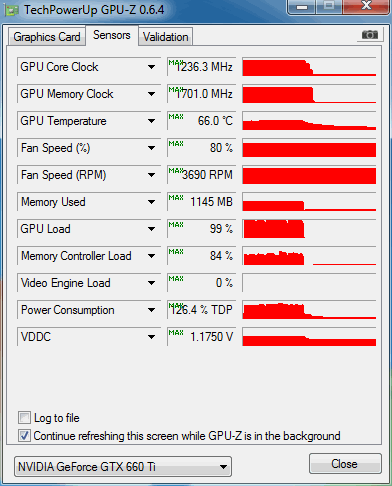
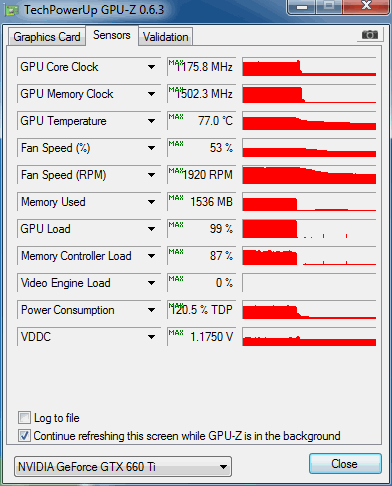
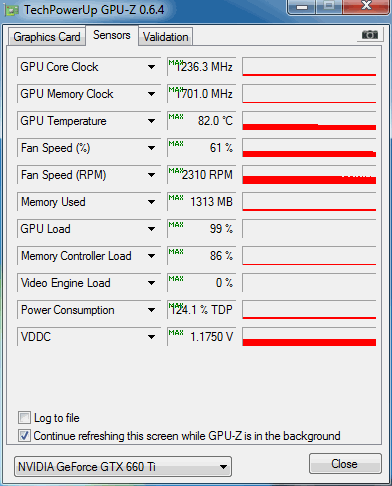
The cooler was never loud while in AUTO mode and never exceeded 61 percent. Once the fan is sped up to 80 percent, you’ll definitely hear it, but it still won’t be too loud.

The following two GPUz shots show temperatures when the fan is in AUTO mode and when maxed out.
gpuz load oc auto fan

gpuz load oc


Thermals at default clock:

gpuz load evga


Power Consumption

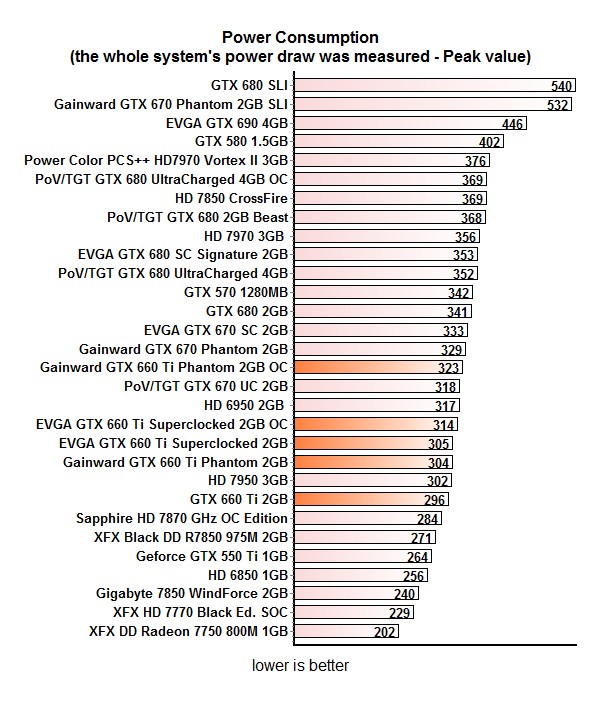
Consumption is good and our overclock cost only about 10W.

consumption

(Page 9 of 10)
Last modified on Thursday, 16 August 2012 18:01
blog comments powered by Disqus

To be able to post comments please log-in with Disqus


Facebook activity

Latest Commented Articles

Recent Comments