Featured Articles

Nvidia GTX 770 spec is out

Nvidia GTX 770 spec is out

In addition to the GK110 based Nvidia Geforce GTX 780, we managed to get some details regarding the GK104-based GTX 770…

More...
Nvidia Geforce GTX 780 detailed

Nvidia Geforce GTX 780 detailed

We managed to confirm the full spec of the upcoming Nvidia Geforce GTX 780 graphics card as well as some performance…

More...
AMD shares take rollercoaster ride

AMD shares take rollercoaster ride

In the last 52 weeks AMD was on a rollercoaster ride, with prices ranging from $1.81 to $6.46. Yesterday it closed…

More...
HIS iCooler Turbo HD 7790 reviewed

HIS iCooler Turbo HD 7790 reviewed

Today we’ll take a closer look at a factory overclocked HD 7790, courtesy of HIS. The HIS HD 7790 iCooler Turbo…

More...
Kingston DataTraveler Ultimate 3.0 Generation 3 (32GB) reviewed

Kingston DataTraveler Ultimate 3.0 Generation 3 (32GB) reviewed

High capacity USB drives have become commonplace a while ago, but although some memory outfits are peddling huge drives, up…

More...
Frontpage Slideshow | Copyright © 2006-2010 orks, a business unit of Nuevvo Webware Ltd.
Sunday, 03 July 2011 07:42

Asus G74SX with 17.3" matte 3D display tested - 8. Temperature and Noise

Written by Sanjin Rados
Asus-G74S-thumbrecommended08_75

Review: Gaming with pleasure

Asus G74SX is a gaming laptop with Nvidia’s GTX 560M and Intel’s Core i7-2630QM, so this means that the device needs quality cooling and Asus did quite well in this department.
Asus-G74S-front_top5

The two fans are not exactly quiet in idle mode, which isn’t great. You’ll hear the airflow, constantly. On the other hand, temperatures are kept in check quite nicely. The hard drive crackle is only occasional and unobtrusive.

The part around WASD keys is quite the coolest region on the upper part of the laptop – it can go up to 31°C. The right palm rest will go up to 30 °C whereas the left side is always much cooler. The hottest part is from the arrow keys upwards, towards the display, up to 35 °C.

It almost goes without saying that you will not use Asus G74S from your lap, be it because you’ll need a mouse or the heat on the right side. In fact, on the right-top part temperatures can hit up to 45°C.

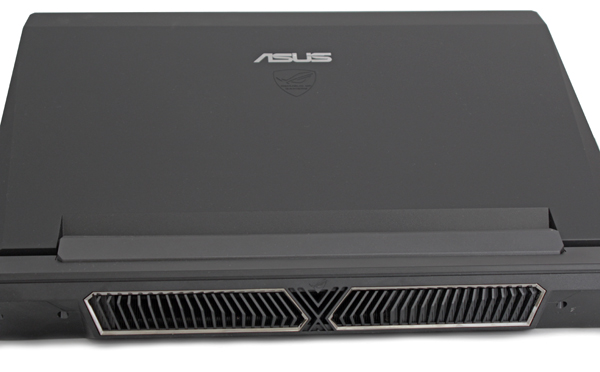
The highest temperature we measured from the large air outlet was 66°C. Note however that this was during long gaming tests.

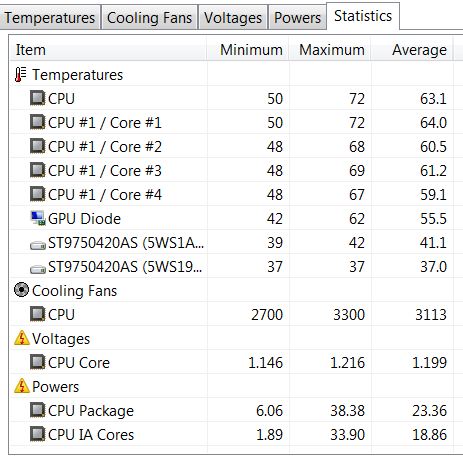
The following screenshots show that components are pretty cool in idle, but that temperatures rise under load.
temperature_load_crysis


(Page 7 of 8)
Last modified on Sunday, 03 July 2011 12:29
blog comments powered by Disqus

To be able to post comments please log-in with Disqus


Facebook activity

Latest Commented Articles

Recent Comments