
Index
- XFX HD 5870 Black Edition tested
- Packaging, Contents
- A closer look at XFX HD 5870 Black Edition
- Testbed
- Futeremark Vantage
- Gaming: FarCry2
- Gaming: Crysis
- Gaming: Batman Arkham Asylum
- Gaming: HAWX
- Gaming: Dirt 2
- Gaming: Metro 2033
- Gaming: Unigine - Heaven
- Overclocking, Consumption amd Temperatures
- Conclusion
- All Pages
Page 13 of 14
Overclocking
XFX’s HD 5870 Black Edition card is pre-overclocked from reference 850MHz to 900MHz, giving the Black Edition card up to 5% better performance compared to the reference card. The card’s memory ticks at 1250MHz (5000MHz) while the reference clocks are at 1200MHz (4800MHz). ATI Overdrive in the the current, 10.4 version does not support GPU overclocking on the Black Edition card. In order to go beyond, we used AMD’s GPU ClockTool v0.9.26. tool.
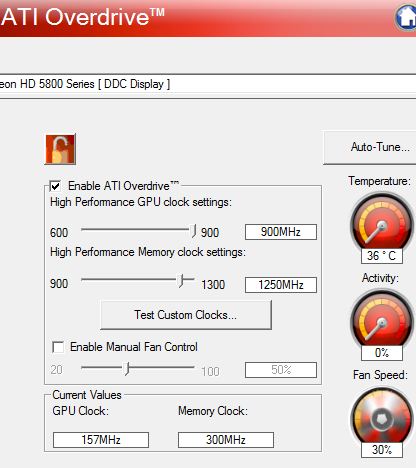
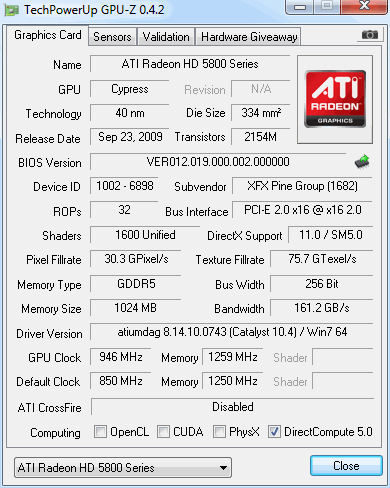
As far as overclocking the memory, we didn’t have much luck with Samsung’s memory – the maximum clocks we managed were 1259MHz (5036MHz). We easily overclocked the GPU by 46MHz more, without meddling with voltage. Note however that we couldn’t meddle with voltages anyways, because the card uses a uPI uP6213 voltage regulator which doesn’t support for changing voltages in software.
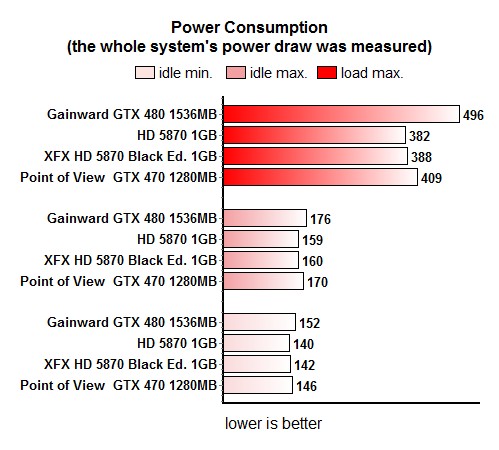
Power consumption is almost the same as on the reference card, although Black Edition runs at higher operating clocks.
The fan is very quiet in idle mode and spins at about 30% RPM (~ 1230 RPM). Maximum fan speed at 100% RPM results in 4227 RPM. In dynamic mode, fan speed reached about 2720, which is audible but not enough to annoy you.
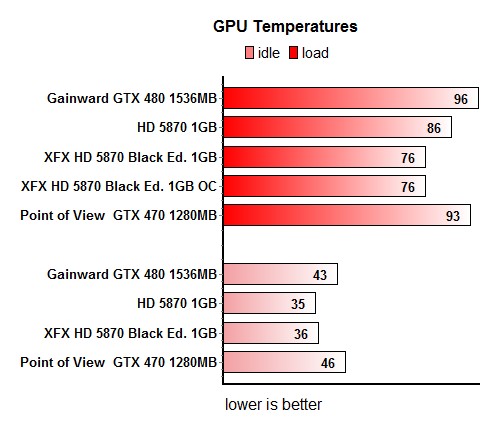
The fan gets a bit irritating as it doesn’t allow for temperatures exceeding 76°C. As soon as the GPU hits anywhere near 76°C, the fan speeds up (up to ~2720RPM) in order to lower temperatures. Afterwards, it gets quieter for a while and then does the entire routine again, depending on the GPU usage.
We solved the varying speed/noise problem by setting the fan at constant 50% RPM (~2260RPM), so that the fan doesn’t get loud during gaming. At the same time, the temperatures lingered around 87°C, which is the same operating temperature we see on reference cards.