Featured Articles

Nvidia GTX 770 spec is out

Nvidia GTX 770 spec is out

In addition to the GK110 based Nvidia Geforce GTX 780, we managed to get some details regarding the GK104-based GTX 770…

More...
Nvidia Geforce GTX 780 detailed

Nvidia Geforce GTX 780 detailed

We managed to confirm the full spec of the upcoming Nvidia Geforce GTX 780 graphics card as well as some performance…

More...
AMD shares take rollercoaster ride

AMD shares take rollercoaster ride

In the last 52 weeks AMD was on a rollercoaster ride, with prices ranging from $1.81 to $6.46. Yesterday it closed…

More...
HIS iCooler Turbo HD 7790 reviewed

HIS iCooler Turbo HD 7790 reviewed

Today we’ll take a closer look at a factory overclocked HD 7790, courtesy of HIS. The HIS HD 7790 iCooler Turbo…

More...
Kingston DataTraveler Ultimate 3.0 Generation 3 (32GB) reviewed

Kingston DataTraveler Ultimate 3.0 Generation 3 (32GB) reviewed

High capacity USB drives have become commonplace a while ago, but although some memory outfits are peddling huge drives, up…

More...
Frontpage Slideshow | Copyright © 2006-2010 orks, a business unit of Nuevvo Webware Ltd.
Monday, 09 February 2009 19:01

Phenom II X4 810 benched - 2 Overclocking

Written by Eliot Kucharik

Image Image

Review: Slower Phenom II X4 for the DDR3 platform


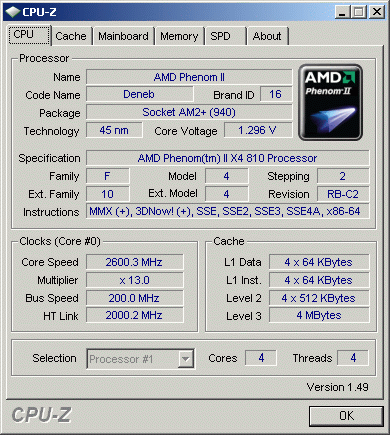
The Phenom II 810's default clock is 2.60GHz, but with a fairly high 1.300V VCore. As we have already stated in our Phenom II 940 Review, this is quite high for a 45nm CPU, but less cache should help to keep the energy consumption lower.
Image

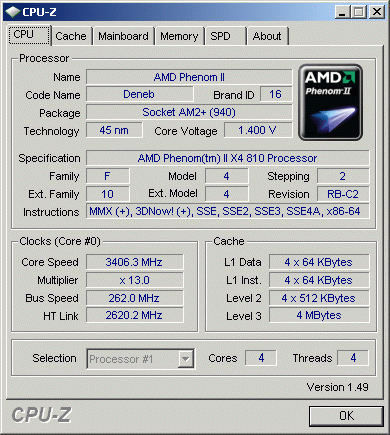
Overclocking in BIOS is not that easy. First you have to increase the virtual FSB, then you have to calculate the HT speed, so you should make sure not to exceed it by too much, as that would make your system unstable. Besides that, your memory speed will also increase, so either lower it or buy modules which support speeds of 1000MHz and more. The new BIOS 1.60 for the MSI DKA790GX features new overclocking options. You can set the voltages not only for the core, but for all the parts of the CPU, including the integrated northbridge. This helps in lowering the VCore, but due to other higher voltages, the power consumption will suffer greatly. After some testing, 100% stable results were achieved at 3.406GHz, which is nice, since it's a hefty 800MHz overclock.
Image

While idling the CPU downclocks to 800MHz and the VCore drops to 1.0000V, regardless of the VCore setting in the BIOS. This may cause trouble with overclocking, but our CPU ran fine with Cool'n'Quiet enabled, because the other voltages were high enough. Disabling Cool'n'Quiet will cause a 20W to 30W increase in power consumption while idling.


(Page 2 of 4)
Last modified on Monday, 09 February 2009 22:33
blog comments powered by Disqus

To be able to post comments please log-in with Disqus


Facebook activity

Latest Commented Articles

Recent Comments