Featured Articles

Intel plans Haswell refresh in Q2 2014

Intel plans Haswell refresh in Q2 2014

Intel has been executing its tick tock strategy flawlessly since January 2006 and now there is some indication that we might…

More...
Xbox One demoed running GTX card

Xbox One demoed running GTX card

It looks like the Xbox One just cannot catch a break. We have stumbled upon a report claiming that Xbox One…

More...
Haswell Pentium and Core specs surface

Haswell Pentium and Core specs surface

Haswell is out and now we have the complete specs for Intel’s first batch of fourth generation Core parts, as well…

More...
EVGA GTX 770 ACX 2GB previewed

EVGA GTX 770 ACX 2GB previewed

Nvidia is hoping that the Geforce GTX 770 will be a very popular product, and EVGA obviously share this view, as…

More...
Gainward GTX 770 Phantom reviewed

Gainward GTX 770 Phantom reviewed

Gainward has now officially unveiled its custom version of the Geforce GTX 770, the Gainward GTX 770 Phantom. Based on the…

More...
Frontpage Slideshow | Copyright © 2006-2010 orks, a business unit of Nuevvo Webware Ltd.
Friday, 04 May 2007 01:45

MSI P6N-SLI Platinum review - 3. Gordian Knot/XVID 1.1.2

Written by Eliot Kucharik
Image Image

Review: MSI P6N-SLI Platinum


Benchmarks:

We didn't bother with synthetic benchmarks, because they won't tell you anything interesting, we concentrate on real world applications, especially multimedia encoding.


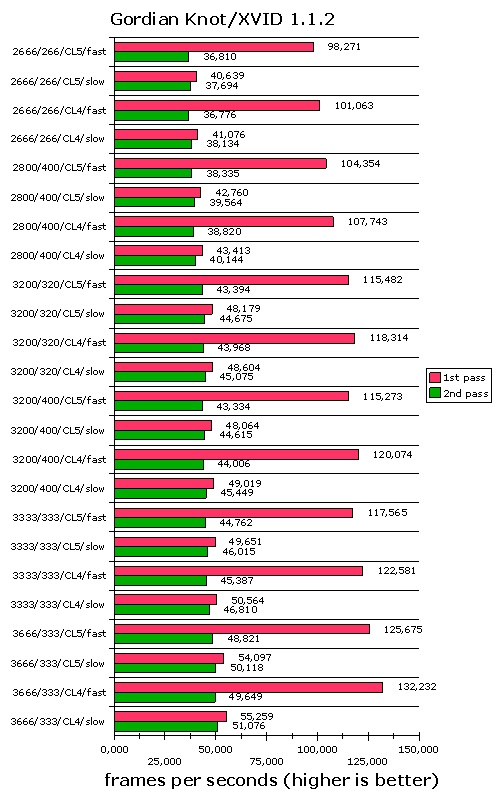
Gordian Knot/XVID 1.1.2:

For our Gordian Knot testing we took a PAL epsiode of "Babylon 5" with a length of 41 minutes, 57 seconds and 8 frames.

We tried to "emulate" the most common usage of Gordian Knot:

1st: We have a perfect master, so we only de-interlace the content and resized it, without any other manipulations, we marked this as "fast".
2nd: You get bad mastering on many DVDs, especially "old" stuff or when the studios are in a hurry for the release. In this case you would want to improve the picture quality, which is done by filtering the content. You can choose from tons of filters for any purposes you can think of, we only used the most common "undot", "FluxSmooth" and "MSharpen". Of course we also de-interlaced. Filters were applied before any resizing took place (which is slower). We marked this as "slow".

If you need more info about filters, we recommend reading the doom9.org forum.

When using filters faster memory doesn't make a big difference, as the 0.5% speed increase is not worth mentioning. Without filters you'll get about 5-6% faster encoding. Of course faster memory has higher voltages and this comes with a penalty of 4-6W in power consumption per GB.

CL5 = CL5-5-5-15-CR2T, CL4 = CL4-4-4-12-CR1T


Image


(Page 3 of 6)
Last modified on Monday, 07 May 2007 18:35
blog comments powered by Disqus

To be able to post comments please log-in with Disqus


Facebook activity

Latest Commented Articles

Recent Comments