Featured Articles

Nvidia GTX 770 spec is out

Nvidia GTX 770 spec is out

In addition to the GK110 based Nvidia Geforce GTX 780, we managed to get some details regarding the GK104-based GTX 770…

More...
Nvidia Geforce GTX 780 detailed

Nvidia Geforce GTX 780 detailed

We managed to confirm the full spec of the upcoming Nvidia Geforce GTX 780 graphics card as well as some performance…

More...
AMD shares take rollercoaster ride

AMD shares take rollercoaster ride

In the last 52 weeks AMD was on a rollercoaster ride, with prices ranging from $1.81 to $6.46. Yesterday it closed…

More...
HIS iCooler Turbo HD 7790 reviewed

HIS iCooler Turbo HD 7790 reviewed

Today we’ll take a closer look at a factory overclocked HD 7790, courtesy of HIS. The HIS HD 7790 iCooler Turbo…

More...
Kingston DataTraveler Ultimate 3.0 Generation 3 (32GB) reviewed

Kingston DataTraveler Ultimate 3.0 Generation 3 (32GB) reviewed

High capacity USB drives have become commonplace a while ago, but although some memory outfits are peddling huge drives, up…

More...
Frontpage Slideshow | Copyright © 2006-2010 orks, a business unit of Nuevvo Webware Ltd.
Monday, 29 October 2007 11:55

Crysis "very high" settings work on XP

Written by Slobodan Simic

Image Image

Crytek in bed with Windows Vista


You have probably read all the performance previews of Crysis, both under Windows Vista and XP.  If you haven't had a chance to check those out, the bottom line is that Windows XP performance is far better than Vista.

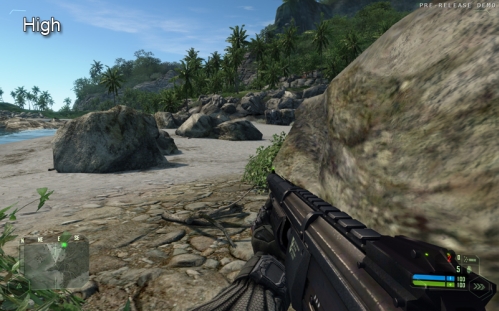
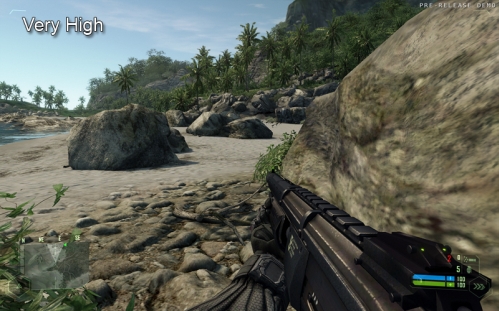
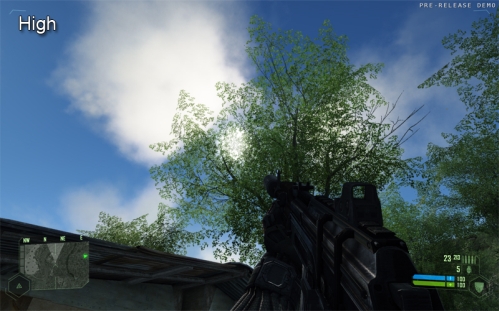
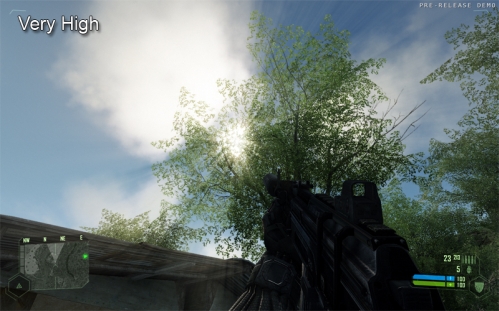
The "Very High" settings were Vista exclusive until someone decided to play around with .cfg files. According to the post made by "LennyRhys" user on the crysis-online.com forums, you can run the game with very high settings, even on your XP. Of course, you will get a 10 FPS drop, but it will look very close to Vista's highly praised DX10 graphics.

According to that post, all you need to do is tweak the configuration files in \CVarGroups\ by copying "very high" lines and then paste them over the "high" settings lines and the game will load the highest possible settings. As you can see from the picture below, you get better shadows, the game looks more realistic and the water looks much more natural.

So there you have it. Crytek likes Vista more than XP. You can find more info here, and here are some pictures to show you the difference.
Image

Image

Image

Image


Last modified on Monday, 29 October 2007 17:44
blog comments powered by Disqus

To be able to post comments please log-in with Disqus


Facebook activity

Latest Commented Articles

Recent Comments